Make Retrieval / Search More Relevant With An LLM [Tutorial + Code]
TLDR: I trained an SLM to improve Amazon search results quality (but works for any search engine)

Suppose you're an AI Engineer at Amazon. A customer searches for “Headphones any colour but black, and under $300, with a 4 star rating”.
This query has implicit filters (colour, price, rating) — if you don’t apply these filters, the search results won’t be very relevant, right?
Well, if you go search this on Amazon right now (or Flipkart, or most sites with a search engine that I tried), you’ll get products that mostly ignores the user’s mentioned filters. Don’t get me wrong — other than this filtering part, the search results are perfectly relevant (and presumably ranked in an order that helps Amazon optimise their commissions). They’re ranked by a SOTA recommendation engine built by the most talented engineers in the world. But it’s the part that happens before any of that — the filtering of products — that I have a problem with.
So I built a model to fix that. It’s called search-expert, it’s an open source 800M param SLM that fits in a fraction of the memory that most LLM demos assume you have.
What is it, exactly?
search-expert takes a natural language search query and converts it into structured JSON — fast, consistently, and without hallucinating fields that weren’t in the query.
"noise cancelling headphones any colour but black, under $200"becomes:
{
  "product":  "headphones",
  "feature":  "noise cancelling",
  "color":    ["ne:black"],
  "price":    "lt:200"
}
The output uses a consistent operator format (lt:, gte:, ne:, between:100:200, etc.) so whatever search backend you’re using downstream — Elasticsearch, ChromaDB, Pinecone, a plain SQL table — can consume it easily :)
Remember: search-expert isn’t made to replace your recommendation system, but to augment it — to make it better with pre-filtering — and your users will thank you!
If this gets you going, here’s a Colab notebook you can use to run the model instantly and try it out:
It works across 10 verticals out of the box: ecommerce, real estate, flights, hotels, jobs, cars, restaurants, movies, healthcare, and courses.
If you find this useful for your domain but don’t see your vertical here, send me a DM and I’d be happy to fine-tune a model on your vertical too!
Who needs this and why?
So I searched for this on Amazon:
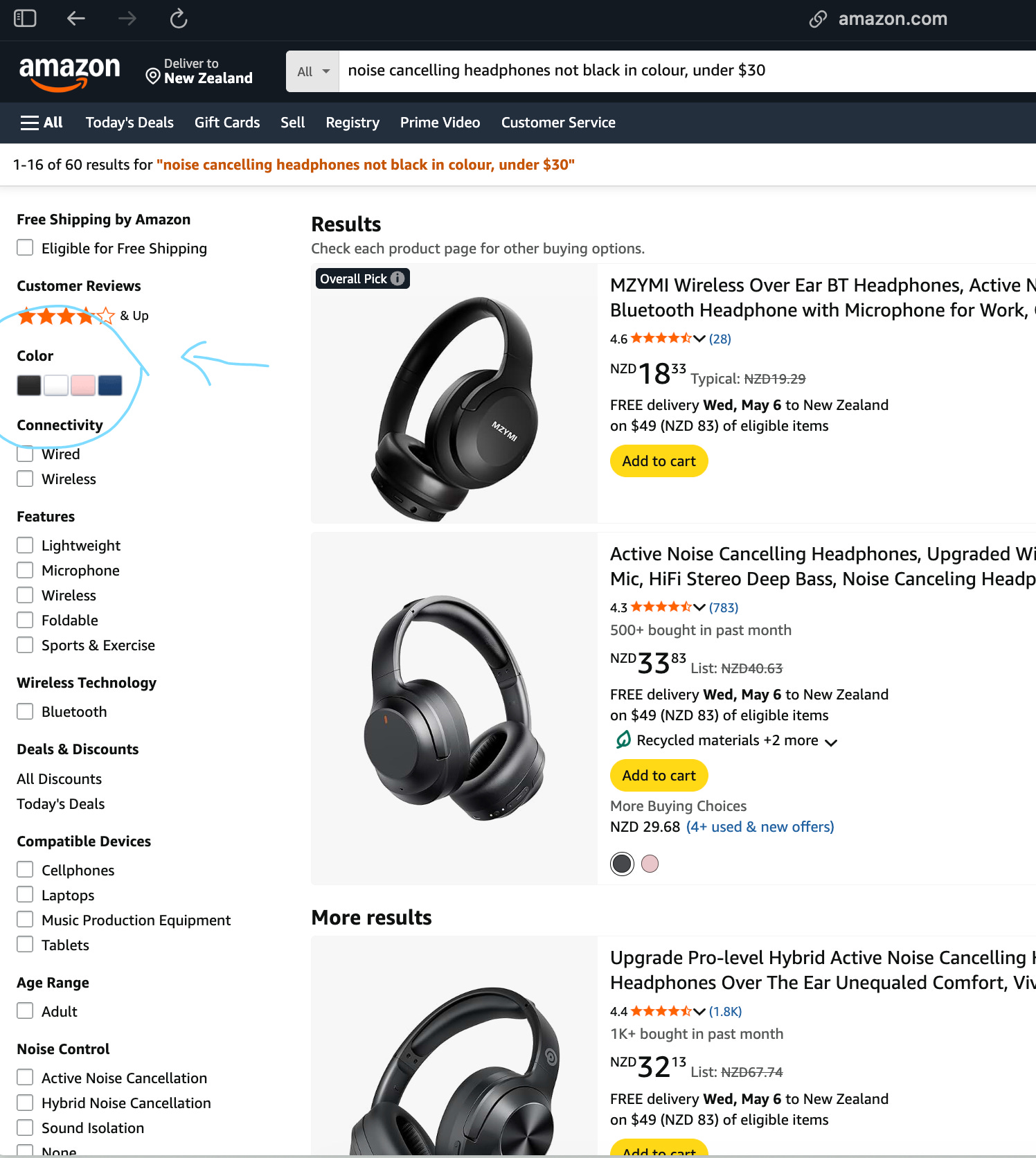
Here's the link — when searched, we see that despite our search they’re all black and some over $30 (which is not because non-black headphones under $30 don’t exist, they just rank lower).
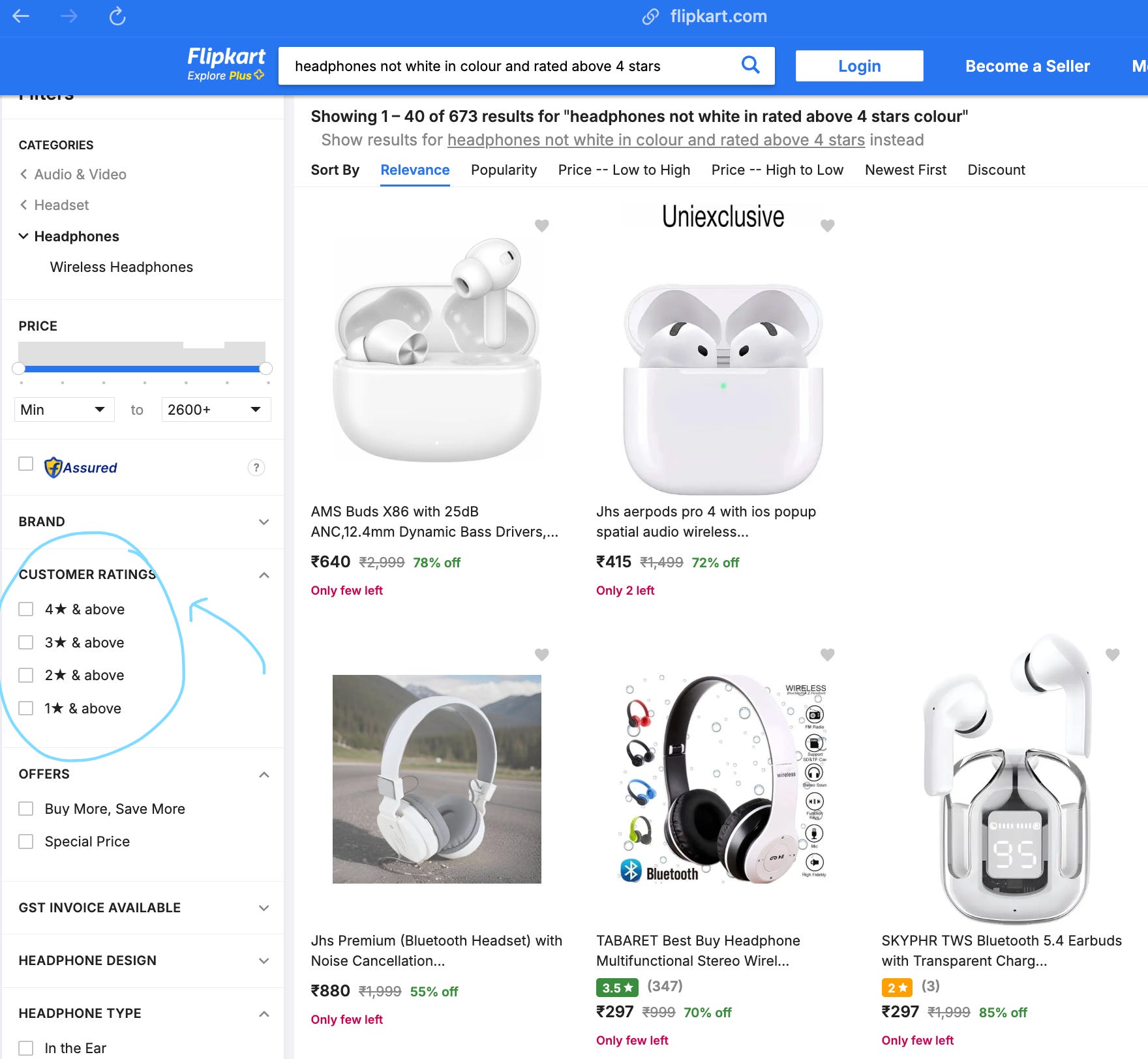
I see something similar on Flipkart, which is kind of India’s OG Amazon.
Now, I want you to look at the blue circles I’ve drawn on the images — we have the ability to filter the products by stars, colours, etc. — they are annotated as such (obviously). But it’s just that the search query we type in doesn’t do this filtering for us.
Let’s assume our goal is to show the user the most relevant products possible for their query. What would we do?
Imagine a scenario where Claude has taken my job and I now sell tech products:
If a customer came to me with this query, I’d first filter out any products that don’t match their criteria (colour, stars, price, etc.) and then rank them by most relevant to anything else they’ve asked for.
SearchExpert is made to do just that.
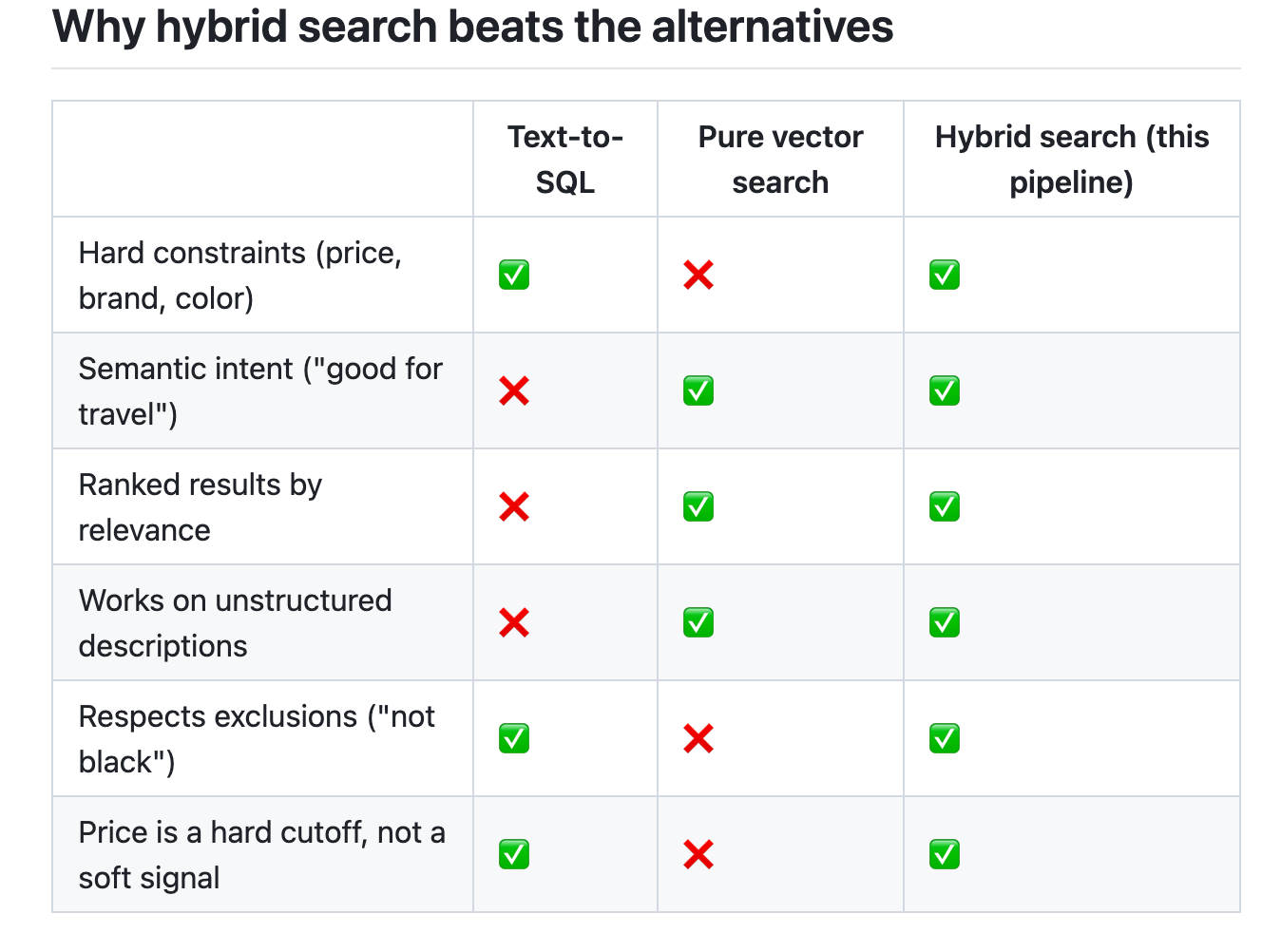
Text-to-SQL is a lookup tool — it returns rows that match, but can’t rank by relevance or understand semantics.
Pure vector search is a semantic tool — it understands meaning, but treats “$200” as a soft hint, not a hard rule. A $350 product can rank above a $180 one if its description is more similar to the query.
This pipeline is a retrieval tool — structured filters enforce the hard constraints first, then vector search ranks the surviving candidates by semantic relevance.
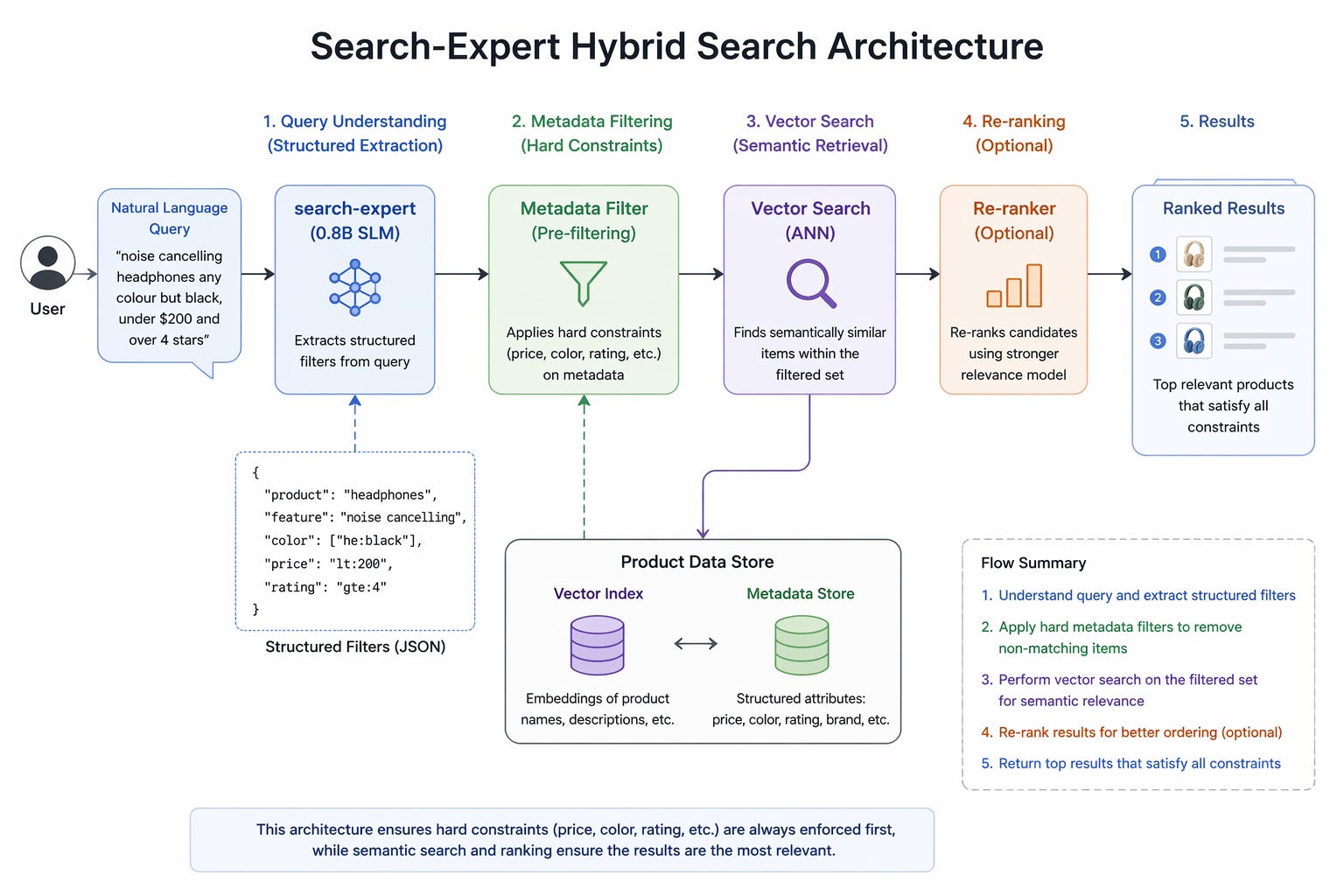
In production, we generally use a version of this pattern:
structured pre-filtering → ANN (approximate nearest neighbour) vector search → learning-to-rank re-ranker.
I know that vector search isn’t the ideal way to retrieve products, but please don’t focus on that part — I’m only talking about step 1, the pre-filtering.
search-expert makes step 1 trivial with a tiny, fast, locally-runnable model.
Why not just use Claude for this?
You could. But consider what this actually needs to do in production: every single search query your users type gets routed through it. If you’re running a mid-sized platform with 50,000 searches per day, that’s 50,000 API calls to Anthropic. At any reasonable cost-per-token that adds up fast, and you’re also adding ~1-2 seconds of latency to every search.
More importantly, the task is constrained enough that you don’t need a trillion param model — or even a billion param one. The output is always structured JSON. The semantic patterns are repetitive. The fields are bounded. This is exactly the kind of task where a purpose-trained small model outperforms a general-purpose large one — not just in cost and speed, but in consistency.
A fine-tuned small model doesn’t get creative. It doesn’t add fields you didn’t ask for (once we’ve instructed it properly). It doesn’t occasionally decide to return a different format because the mood struck it. It does the one thing it was trained to do, reliably, every time.
The model
I fine-tuned a custom model for this — named search-expert-json-0.8b — you can find it on my HuggingFace.
How the model is trained:
search-expert is a LoRA fine-tune of Qwen3.5-0.8B, a compact 800M-param base language model. Rather than training the full model weights — which would require substantially more compute and memory — LoRA (Low-Rank Adaptation) freezes the base model and injects small trainable rank-decomposition matrices into the attention and feed-forward projection layers: q_proj, k_proj, v_proj, o_proj, gate_proj, up_proj, and down_proj. With rank r=16 and lora_alpha=16, this means only 0.74% parameters are actually updated during training, while the underlying Qwen3.5-0.8B weights remain unchanged. The base model is loaded in 4-bit NF4 quantization via bitsandbytes, which reduces its VRAM footprint to around 1–2 GB, making the entire fine-tuning pipeline runnable on a free Colab T4 GPU.
Training uses Unsloth’s FastLanguageModel backend, which applies kernel-level optimizations — fused attention, custom triton kernels, and gradient checkpointing — to significantly reduce memory usage and increase throughput compared to vanilla Hugging Face PEFT training. The effective batch size is 16 (8 per device × 2 gradient accumulation steps), trained for 300 steps with a cosine learning rate schedule, a warmup of 100 steps, and a peak learning rate of 2e-4 with AdamW 8-bit. Sequence packing is enabled, meaning multiple short training examples are concatenated into a single sequence up to the 512-token limit, which keeps GPU utilization high and avoids wasted padding compute.
The training data is a dataset of 100,000 (query, structured output) pairs spanning 10 search domains. It was generated synthetically by yours truly too :) Each example is formatted as a supervised prompt: the query goes in as the user turn, and the expected structured output — in whichever serialization format is being trained — goes in as the assistant turn, followed by the EOS token. The model is trained to produce only the structured fields that are explicitly present in the query, without hallucinating values that weren’t mentioned. A separate LoRA adapter is trained for each output format (JSON, YAML, etc.), with the base model reloaded fresh for each run and VRAM cleared between them.
Here are some more examples:
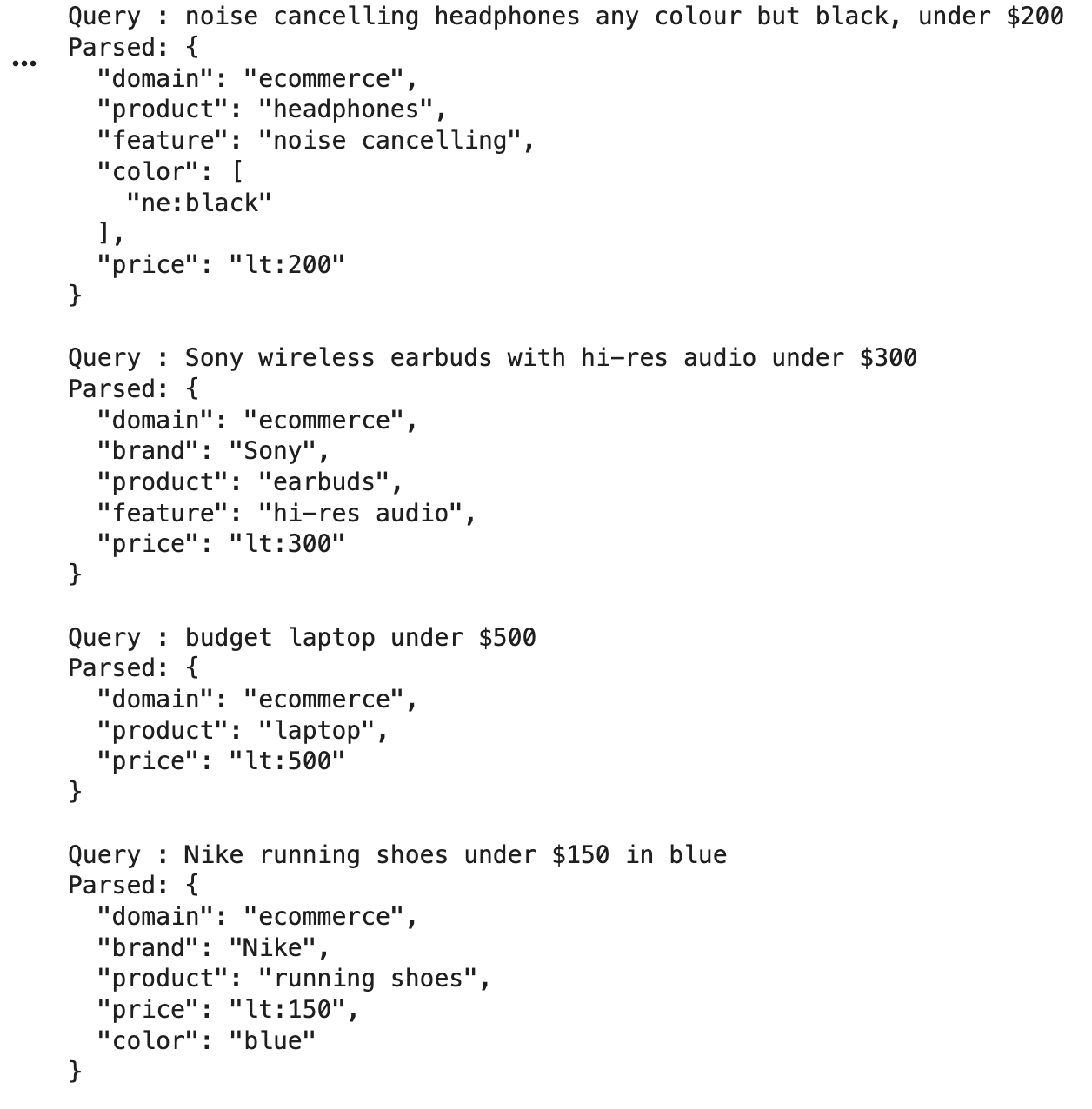
But wait — isn’t this just text-to-SQL?
This is a fair question and I want to answer it properly, because the distinction actually matters for understanding why the library is useful.
Text-to-SQL is a lookup tool. It assumes your data lives in a relational database with a known schema, and it generates a query that returns exact matches. It’s great for analytical questions — “how many orders did we get from Delhi last quarter?” — where you want rows, not ranking.
Search is a retrieval tool. It’s asking a fundamentally different question: not “which rows match?” but “which items are most relevant?” And relevance has a component that SQL can’t touch: unstructured text.
When a user searches for “comfortable headphones for long flights,” part of what they mean is captured in structured fields (wireless, noise cancelling, maybe under a certain price). But part of it lives in product descriptions — “ultra-soft ear cushions,” “designed for travel,” “lightweight enough to wear for hours.” That semantic layer requires vector search, not a WHERE clause.
So the real pattern that works in production looks like this:
structured extraction (search-expert)
    → hard metadata filters (price, brand, color)
        → vector search within the filtered set
            → ranked results by semantic similarity
This is hybrid search, and it’s more or less how every serious ecommerce search system at scale works. Many search engines run some version of structured pre-filtering before hitting their retrieval layer. The difference is that their query parsers are massive internal systems built over years. search-expert makes step one of that pipeline accessible with a pip install.
The hybrid search demo
To make this concrete, I put together an end-to-end ecommerce search demo using search-expert and ChromaDB. I created some synthetic data:
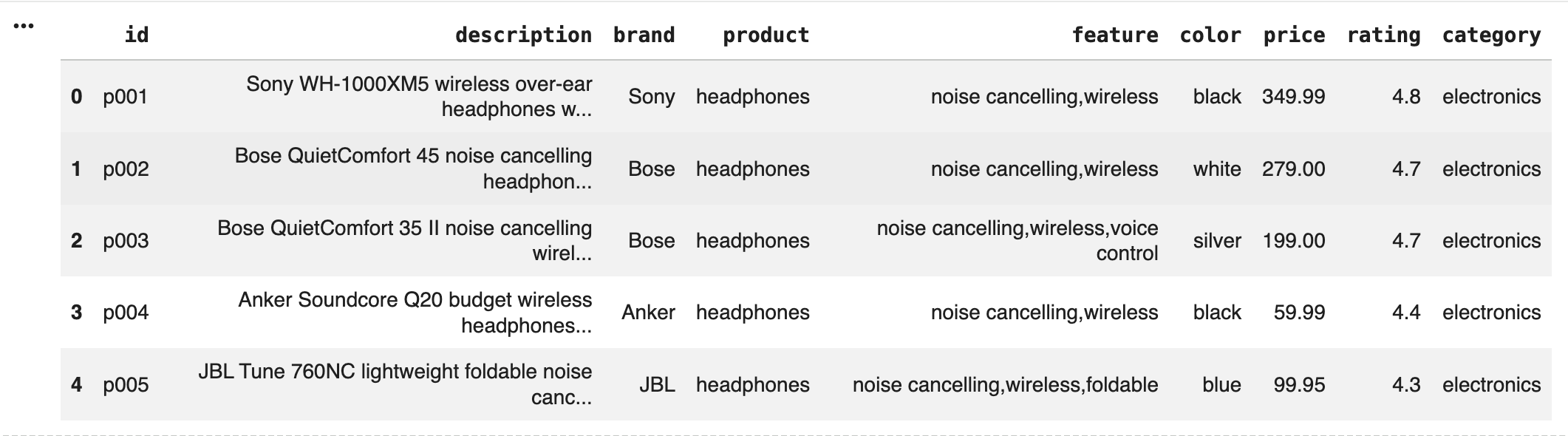
ChromaDB can be conveniently used as a local vector database — it stores both embeddings (for semantic search) and metadata (for hard filtering), and it lets you apply both in a single query. For the demo, products are embedded using all-MiniLM-L6-v2, a small but highly capable sentence embedding model that runs fully locally.
The pipeline looks like this in practice:
User types: "noise cancelling headphones any colour but black, under $200 and over 4 stars"
Step 1 — search-expert extracts structure:
json
{
  "product": "headphones",
  "feature": "noise cancelling",
  "color":   ["ne:black"],
  "price":   "lt:200",
  "rating":  "gte:4"
}
Step 2 — this becomes a ChromaDB metadata filter:
json
{
  "$and": [
    { "product": { "$eq": "headphones" } },
    { "feature": { "$contains": "noise cancelling" } },
    { "color":   { "$ne": "black" } },
    { "price":   { "$lt": 200.0 } }
    { "rating":  { "$gte": 4 } }
  ]
}
Step 3 — vector search runs within that filtered set, embedding the original query and finding the most semantically similar product descriptions among the candidates that passed the hard filter.
Step 4 — ranked results, ordered by cosine similarity.
The hard filter ensures you never see a $400 product when the user said “under $200,” and you never see a black product when they said “any colour but black.” The vector search ensures the best matching products within that set bubble to the top based on what the descriptions actually say — not just metadata tags.
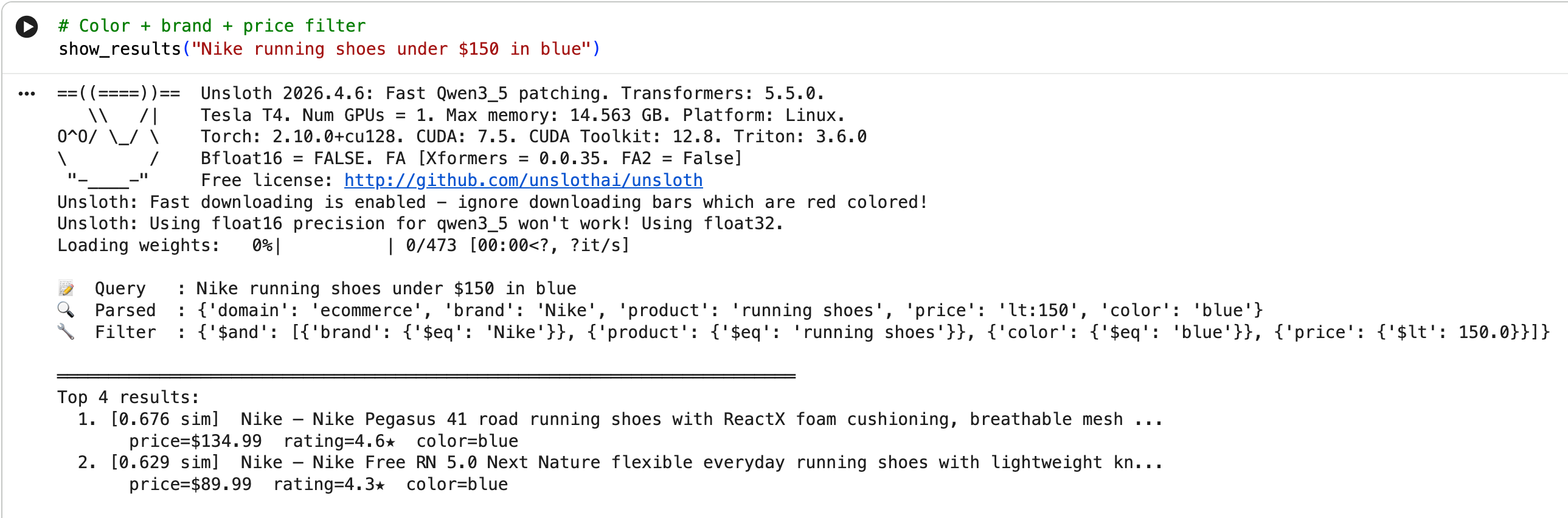
You can run the full demo yourself in this Colab notebook linked in the repo. It builds the vector index, runs several example queries, and shows you the parsed JSON, the generated filter, and the ranked results at each step.
What the numbers look like
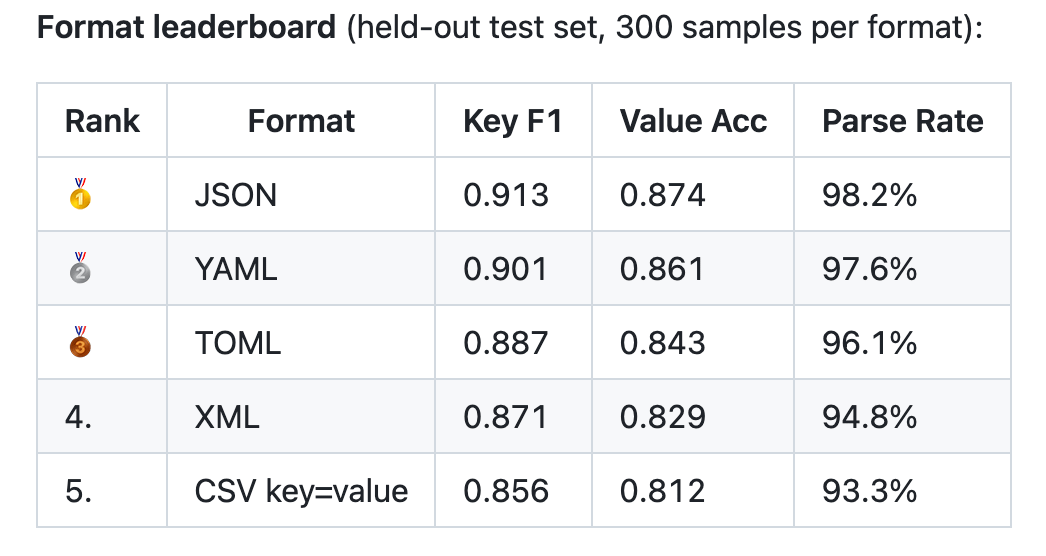
Key F1 measures whether the right fields were extracted. Value accuracy measures whether the values (including operator prefixes) were correct. Parse rate measures how often the output was valid, parseable structured data rather than garbled text.
0.913 key F1 and 98.2% parse rate on a 0.8B model is, honestly, better than I expected going in.
Comparing this to Amazon Search: Benchmarking
I pulled data from Amazon Search — by running different search queries on Amazon US and parsing the top 30 results (or as many as SerpApi would give me).
This file shows how I pulled this data.
I’ve made this dataset available on HuggingFace too :)
The goal of this benchmark is simple: when a user says “not black” or “under $200,” do the search results actually respect those constraints? Relevance alone doesn’t capture this — a semantically perfect result for “noise-cancelling headphones” that happens to be black and costs $350 is still a bad result if the query excluded black and capped the price at $200. So I evaluate entirely on constraint satisfaction: for each query, I look at the top 6 results from each pipeline and measure what fraction of them satisfy the hard constraints the user specified.
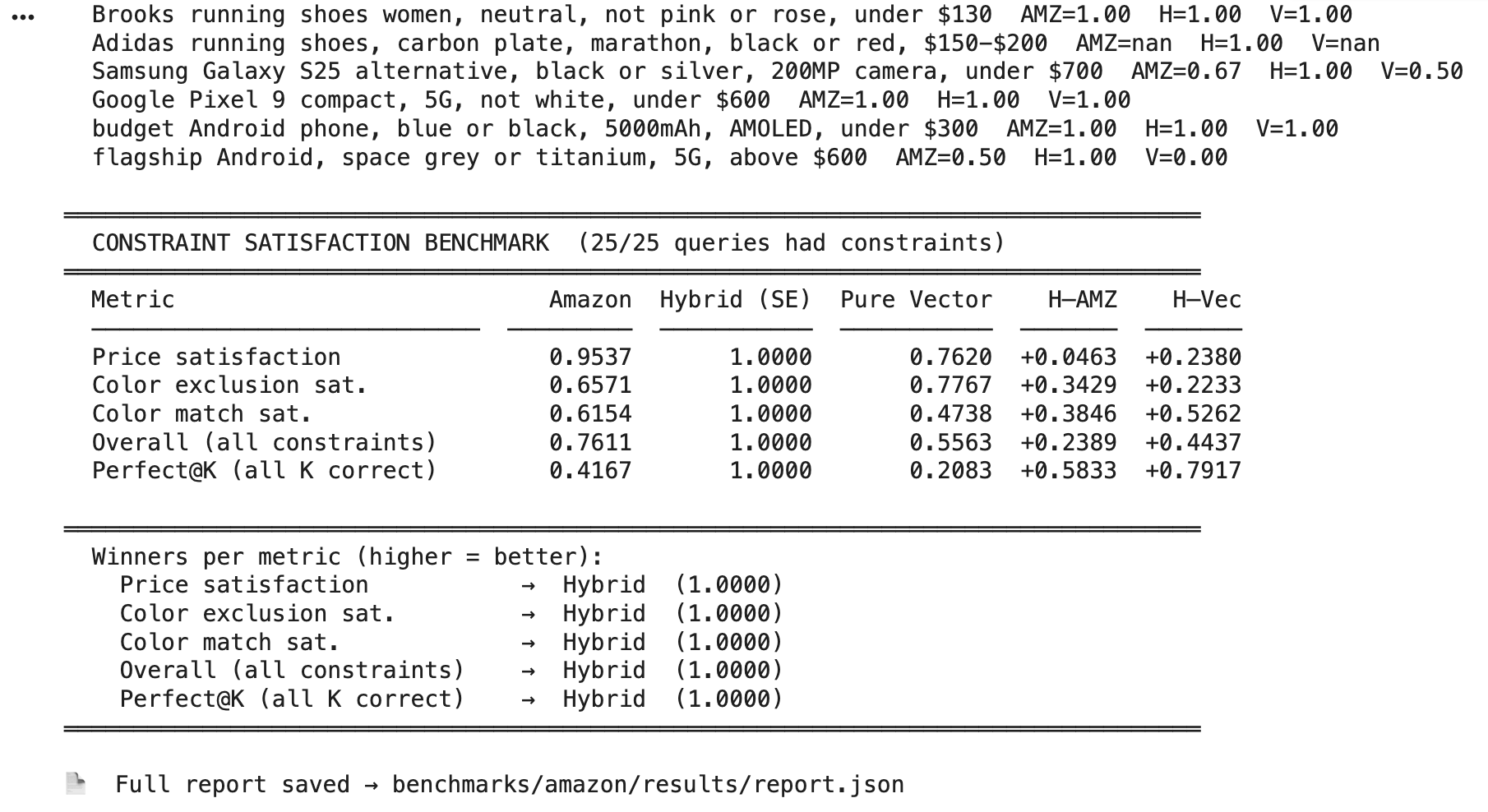
I ran three pipelines on the same pool of Amazon products across 25 complex, multi-constraint queries. The first is Amazon’s own search — let’s treat whatever Amazon returned as its pipeline’s output, ranked exactly as Amazon ranked it. The second is our hybrid pipeline, which uses search-expert to parse the natural language query into structured filters (price ceiling, color exclusions, color requirements), applies those as hard pre-filters in ChromaDB, then ranks the surviving products by vector similarity. The third is pure vector search with no filtering at all — just semantic similarity against the query text.
I measure five things per pipeline.
Price satisfaction is the fraction of top-6 results priced within the user’s stated limit.
Color exclusion is the fraction that don’t have a color the user explicitly rejected.
Color match is the fraction that do have a color the user asked for.
Overall combines all applicable constraints simultaneously — a product only counts if it satisfies every constraint that applied to that query.
Perfect@6 is the strictest cut: it’s 1.0 only if every single one of the 6 results satisfies every constraint, and 0.0 otherwise.
The results were clear. The hybrid pipeline scored 1.0 on every single metric — perfect price satisfaction, perfect color exclusion, perfect color match, across all 25 queries. Amazon’s own search scored 0.76 overall, with price satisfaction at 0.95 but color constraints handled far less reliably: color exclusion at 0.66 and color match at 0.62, meaning roughly 1 in 3 results for a query like “not black headphones, silver or white” would still be black or the wrong color. Pure vector search performed worst overall at 0.56, with color match dropping to 0.47 — which makes intuitive sense, since embedding similarity treats color as a soft semantic hint rather than a rule to enforce. On the strictest measure, Perfect@6, the hybrid pipeline scored 1.0 against Amazon’s 0.42 and pure vector’s 0.21.
The key takeaway is that structured pre-filtering is doing real, measurable work. Vector search is good at knowing that a query about “noise-cancelling headphones good for travel” should surface headphones — but it has no mechanism to enforce “and not the black ones, and not more than $150.” That gap is exactly what search-expert fills: it extracts those hard constraints and hands them to ChromaDB as metadata filters before vector search ever runs, so the semantic ranking step only sees candidates that already satisfy the rules.
What’s next
A few things I want to explore:
Going smaller. The 0.8B model is already fast, but I want to see how small this can go. A 0.5B or even 0.3B model might be sufficient for a constrained extraction task like this — and if it is, that opens up on-device deployment on phones and embedded systems.
Training from scratch. LoRA adapts an existing model. At some point it’s worth asking whether a purpose-built architecture — something like a small encoder model trained purely on structured extraction — could outperform an adapted generative model at this specific task while being an order of magnitude smaller.
More domains. The current 10 domains cover a lot of common search use cases, but there’s an obvious long tail — finance, travel, legal, medical, recruitment. Happy to take requests! Similarly, when benchmarking against Amazon data, I’m only getting filters like colour, price, and rating because these are what’s readily available in the search data from SerApi — I’d love to test the search-expert model on dozens of filters to push it to its limit, but that needs more granular data from Amazon Search!
A re-ranking layer. The current demo ends at vector similarity. In a real pipeline you’d want a cross-encoder re-ranker as a final step to really nail the ordering. That’s a natural next addition to the library.
Try it!!
pip install search-expertfrom search_expert import SearchExpert
expert = SearchExpert()
result = expert.parse("Sony noise cancelling earbuds under $300 with hi-res audio")
print(result.fields)The model weights are on HuggingFace, the full source is on GitHub, and the ecommerce hybrid search demo is available as a Colab notebook.
If you’re building search infra and want a lightweight, locally-runnable query parser that doesn’t require hitting an API, I’d love for you to try it and tell me what breaks.
As always, if you need help, reach out:
search-expert is MIT licensed. Contributions, issues, and feedback welcome.
GitHub: sarthakrastogi/search-expert HuggingFace: sarthakrastogi/search-expert-json-0.8b
Footnotes
This model was trained during my trip to Hong Kong, so it only feels right to show you these photos I took of this beautiful city. Thank you for reading!